How a Browser Works
The whole agenda of this blog is to understand just one thing, i.e. What actually happens when you type a url and press Enter? Pause for a second and think about this moment. You type example.com into your browser. You press Enter. A fully designed webpage appears almost instantly. No loading bars. No visible machinery. Just pixels. But under the hood, something astonishing happens.
Lets take a look what all the browser does(in fraction of a second) -
Talks to servers across the internet
Downloads raw text files
Understands multiple languages
Builds internal data structures
Calculates geometry
And finally paints millions of pixels on your screen
This article is the story of that journey, from URL to pixels, explained gently, visually, and without assuming prior knowledge. You don’t need to memorize anything. You just need to follow the flow.
A browser is not “a website opener”
A browser is often described as “software that opens websites.” That description is technically correct and deeply misleading.
A better mental model is this:
A browser is a code-to-pixels engine.
It takes three primary inputs:
HTML – what exists on the page
CSS – how it should look
JavaScript – how it should behave
And its output is simple:
Colored pixels on a screen, updated continuously.
Everything else the browser does exists to serve this transformation.
The browser is a collection of cooperating systems
Rather than one giant program, a browser is a set of specialized components working together.
At a high level, you can imagine:
A User Interface that you interact with
A Networking layer that fetches data
A Rendering engine that turns code into visuals
A JavaScript engine that runs logic
A Browser engine that coordinates everything
Think of this like a film production:
The script exists
The actors perform
The director coordinates timing
The editor assembles the final output
No single part produces the movie alone.
The user interface: everything around the page
The address bar, tabs, navigation buttons, these feel obvious, but they hide an important idea.
The browser UI is not part of the webpage.
The webpage begins below the address bar.
Everything above it belongs to the browser itself.
This separation matters because the browser UI:
Exists even when no page is loaded
Is implemented differently across browsers
Never becomes part of the DOM you interact with as a developer
The page lives inside the browser, not the other way around.
Pressing Enter: the networking journey begins
Once you press Enter, the browser’s first job is not rendering. It’s fetching.
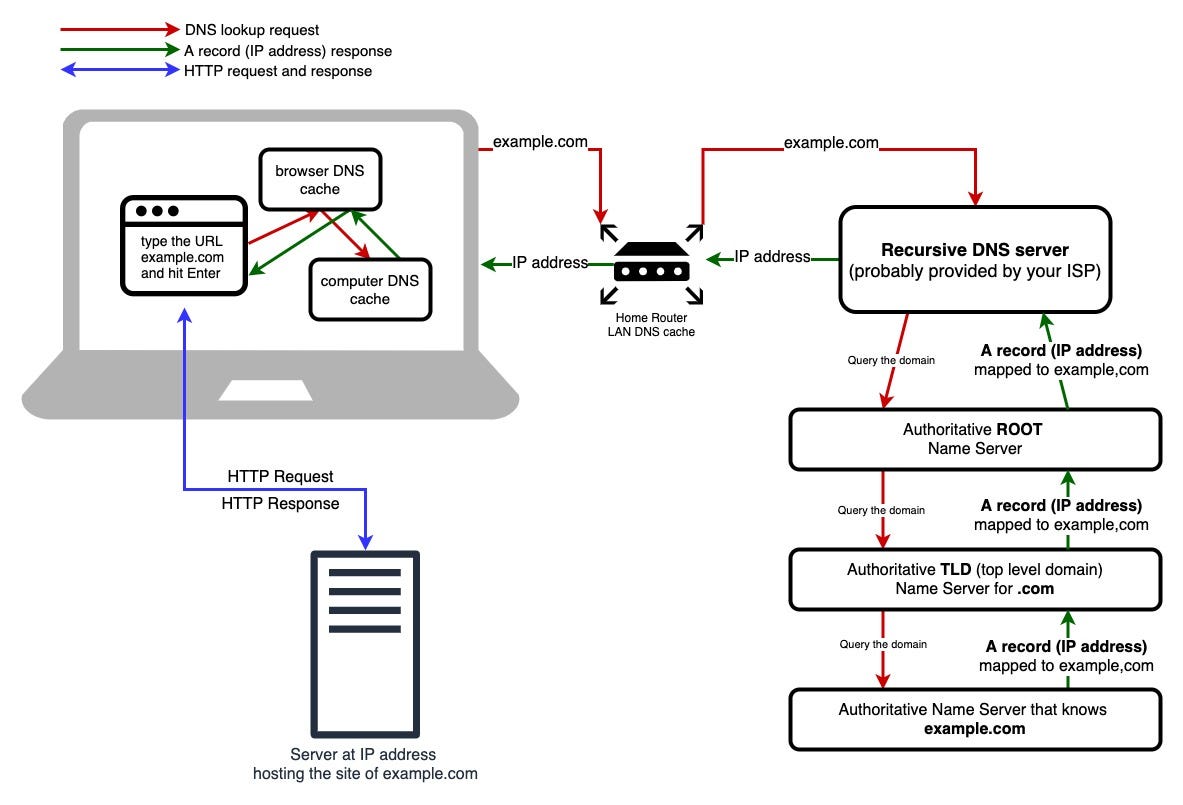
The browser checks if it already has what it needs.
If not, it asks the network:
Where is this server?
How do I connect to it?
What does it want to send me?
The result of this exchange is usually a stream of plain text HTML. At this moment, nothing looks like a webpage yet. It’s just characters.
HTML doesn’t become a page it becomes a tree
The browser doesn’t display HTML. It parses it. Parsing means turning raw text into structured meaning.
As HTML arrives, the browser reads it top to bottom and constructs a tree called the DOM, the Document Object Model. Each tag becomes a node. Nesting becomes parent-child relationships. This tree is the browser’s internal understanding of -
CSS is parsed into a separate world
While HTML defines structure, CSS defines appearance. But CSS does not directly style the DOM. Instead, it becomes its own structure: the CSSOM.
The CSS Object Model represents:
All style rules
Inheritance relationships
Conflicts and overrides
If the DOM answers “what exists?”,
the CSSOM answers “what should it look like?”
Keeping these separate allows the browser to reason about structure and style independently, which turns out to be critical for performance.
When structure meets style: the Render Tree
Only now does rendering truly begin.
The browser combines:
The DOM (elements)
The CSSOM (styles)
Into a new structure: the Render Tree. This tree contains -
Only visible elements
Each element annotated with computed styles
Invisible elements (display: none) never make it here. They are never painted. They don’t exist visually.
Painting: from calculations to pixels
At last, we reach the final act.
The browser paints:
Text glyphs
Backgrounds
Borders
Images
Shadows
These painted layers are composited, often with GPU help, and finally pushed to the screen.
This process repeats constantly:
When you scroll
When animations run
When JavaScript changes the DOM
Rendering is not a one-time event, it’s a loop.
Parsing, demystified with a tiny example
Parsing sounds intimidating, but you already understand it intuitively.
Take this expression -
2 + 3 * 4

/// a parser breaks into tokens *

2, +, 3, *, 4

It understands the structure

  +
 / \
2   *
   / \
  3   4
You don’t read it as characters. You understand structure and precedence.
The browser does the same with HTML-
Characters become tokens
Tokens become relationships
Relationships become trees
Parsing is simply teaching a machine to understand structure, not just text.

From the moment you press Enter:
The browser fetches HTML
HTML becomes the DOM
CSS becomes the CSSOM
DOM and CSSOM become the Render Tree
Layout computes geometry
Paint draws pixels
The screen updates
All of this happens faster than a blink.
Final words
Understanding browsers is not about memorization. It’s about building a mental movie you can replay. Each time you learn frontend performance, animations, or debugging, this movie gets clearer. Browsers are pipelines. Code flows in. Pixels flow out. And now, we know what happens in between.